Logo is not shown in Emails
Inhaltsverzeichnis
Applies to:
All Versions of Cryptshare Server
Symptom:
E-mail notifications should have a logo in the upper left corner. However the logo is not shown within the Email client. 
Cause:
There are two reasons why the logo may not be shown:
- The e-mail client blocks contents from external sources.
- The URL to the logo is not using an https connection or the Cryptshare Server Certificate is a private one
Solution:
Solution 1 : Temporarily allow the download of external contents.
Most e-mail clients do not show external contents by default, but instead ask the user whether he wants to see those contents temporarily or permanently.
Outlook 2013 - Showing the Cryptshare Application Logo

IBM Notes - Showing the Cryptshare Application Logo
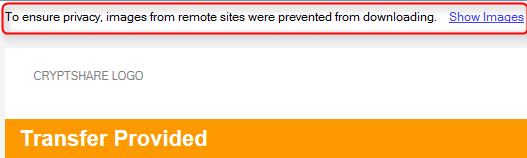
In order to see the logo, one of the available options for showing the content has to be selected.
Outlook 2013 - Showing the Cryptshare Application Logo

IBM Notes - Showing the Cryptshare Application Logo

In order to see the logo, one of the available options for showing the content has to be selected.
Solution 2: Permanently allow download of external contents from the Cryptshare Server
Most e-mail clients do not show external contents by default, but can be configured to automatically download external contents from certain sources or generally.
Outlook 2010 - Outlook 365 - Changing the default behaviour for downloading external contents.
Refer to the following Microsoft Knowledge Base Article for detailed information on how to configure the MS Outlook Client according to your needs:
https://support.office.com/en-us/article/Block-or-unblock-automatic-picture-downloads-in-email-messages-15e08854-6808-49b1-9a0a-50b81f2d617a
IBM Notes - Changing the default behaviour for downloading external contents.
The general behaviour of the IBM Notes Client can be influenced in the Notes Client Preferences.
Click on File | Preferences | Mail | Internet:
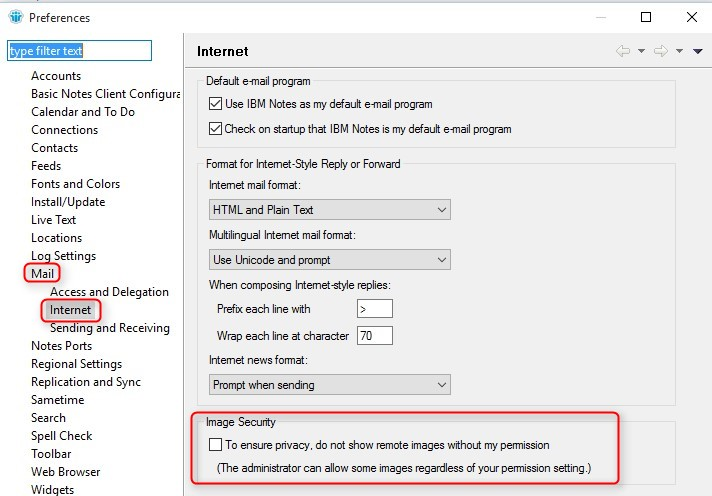
Please note that in IBM Notes 9.0 this setting may also be influenced by your company's client desktop policy in IBM Notes.
Outlook 2010 - Outlook 365 - Changing the default behaviour for downloading external contents.
Refer to the following Microsoft Knowledge Base Article for detailed information on how to configure the MS Outlook Client according to your needs:
https://support.office.com/en-us/article/Block-or-unblock-automatic-picture-downloads-in-email-messages-15e08854-6808-49b1-9a0a-50b81f2d617a
IBM Notes - Changing the default behaviour for downloading external contents.
The general behaviour of the IBM Notes Client can be influenced in the Notes Client Preferences.
Click on File | Preferences | Mail | Internet:

Please note that in IBM Notes 9.0 this setting may also be influenced by your company's client desktop policy in IBM Notes.
Solution 3 : The URL to the logo cannot be resolved
The setting for the Cryptshare Base-URL begins with http instead of https

Change the setting for the Base-URL so it is setup using https.
The server is using a private SSL certificate which has not been imported to the clients local certificate store
* Either setup your Cryptshare Server to use a public certificate.
* or import the private certificate to the local certificate store of the client where the problem occurs.
* Change your Cryptshare Server Mail Settings:


Set the handling for images to either "Embedded" or "Multipart attachment" so the log is not referenced by
url but directly part of the email.
Due to the internal infrastructure (internal DNS, Cryptshare server behind a proxy or firewall which provide a
public SSL certificate for external) it may not be possible to resolve the Base-URL of the Cryptshare Server
Please check your security settings
Related Articles
Removing the Application Logo from email templates
Applies to All versions of Cryptshare Server Purpose This article shows an example for one of the possibilites for modifying Cryptshare E-Mail Templates as described in the Cryptshare Server Manual. In this case, the email template is changed so that ...Email logo cannot be uploaded on the Administration Interface
Applies to: All Cryptshare Server on Linux systems Symptom: After uploading an email logo an error occurs that says "the email template application logo could not be installed" Cause: There's a situation preventing the Cryptshare admin to upload an ...Transfer Manager is not shown
Applies to All versions of Cryptshare for Outlook Symptom When starting Outlook the Cryptshare Transfer Manager is not visible and cannot be activated. Cause The Windows 10 AppLocker blocks required libraries. Solution Create a policy rule that ...Email stuck in Outbox when sending Cryptshare transfers
Applies to All versions of Cryptshare for Outlook Symptom When sending emails by Cryptshare for Outlook they stuck in the outbox. Cause In some Outlook environments sent emails have to be marked for deletion in order to being sent. Solution This ...Unsupported virtual machine settings
Applies to: Cryptshare Server version 4.4 and higher Symptom: After processing Cryptshare Server update the old version is shown Cryptshare service of version 4.5 and higher is not starting Solution: 1. Upgrade system hardware 2. Change Guest OS ...