Cryptshare doesn't start after rollback to previous version
Applies to:
All versions of Cryptshare Server
Symptom:
After rolling back to a previous version the Cryptshare Server is not available.
Cause:
The Java installation folder has not been restored.
Solution:
There are three approaches to restore Java:
- Java backup is stored in the Cryptshare installation folder
- Java backup is in the pre-update backup
- Java backup is not contained in the pre-update backup
How to restore Java from direct backup
# run the following command, to check the installation folder
ls -lh /opt/cryptshare-3
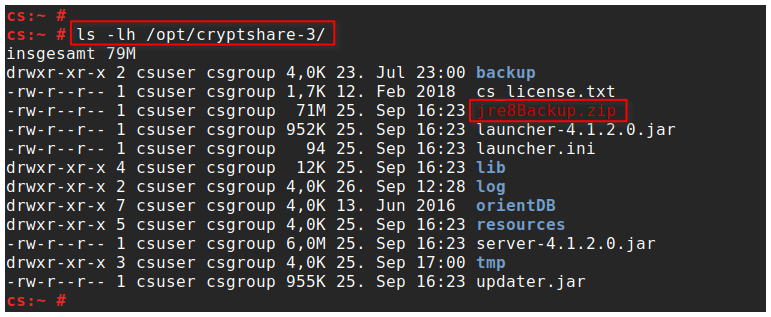
# run the following command, to restore the Java installation
unzip -q /opt/cryptshare-3/jre8Backup.zip -d /opt/cryptshare-3/
mv /opt/cryptshare-3/jre8_BAK/ /opt/cryptshare-3/jre8
ln -s /opt/cryptshare-3/jre8 /opt/cryptshare-3/jre8_x64
chmod 755 /opt/cryptshare-3/jre8/bin/java

# run the following command, to start Cryptshare service
systemctl start cryptshare (use rccryptshare start up to and including v.7.1)
# run the following command, to check the installation folder
ls -lh /opt/cryptshare-3

# run the following command, to restore the Java installation
unzip -q /opt/cryptshare-3/jre8Backup.zip -d /opt/cryptshare-3/
mv /opt/cryptshare-3/jre8_BAK/ /opt/cryptshare-3/jre8
ln -s /opt/cryptshare-3/jre8 /opt/cryptshare-3/jre8_x64
chmod 755 /opt/cryptshare-3/jre8/bin/java

# run the following command, to start Cryptshare service
systemctl start cryptshare (use rccryptshare start up to and including v.7.1)
2. Java backup is in the pre-update backup
How to restore Java from pre-update backup:
# unpack the pre-update backup to the temp folder
mkdir /tmp/pre-update
unzip -q /opt/cryptshare-3/backup/pre_update_<DATE>_
# unpack the pre-update backup to the temp folder
mkdir /tmp/pre-update
unzip -q /opt/cryptshare-3/backup/pre_update_<DATE>_
3. Java backup is not contained in the pre-update backup
How to restore Java from original installation folder:
# download and unpack the corresponding package to the temp folder
mkdir /tmp/pre-update
wget http://update.cryptshare.com/data/server-3.11.2.0.zip
unzip -q server-3.11.2.0.zip -d /tmp/pre-update
# run the following commands, to restore the Java installation
cp -r /tmp/pre-update/jre/linux/x86/ /opt/cryptshare-3/jre8
ln -s /opt/cryptshare-3/jre8 /opt/cryptshare-3/jre8_x64
chmod 755 /opt/cryptshare-3/jre8/bin/java
rm -rf /tmp/pre-update
# run the following command, to start Cryptshare service
systemctl start cryptshare (use rccryptshare start up to and including v.7.1)
# download and unpack the corresponding package to the temp folder
mkdir /tmp/pre-update
wget http://update.cryptshare.com/data/server-3.11.2.0.zip
unzip -q server-3.11.2.0.zip -d /tmp/pre-update
# run the following commands, to restore the Java installation
cp -r /tmp/pre-update/jre/linux/x86/ /opt/cryptshare-3/jre8
ln -s /opt/cryptshare-3/jre8 /opt/cryptshare-3/jre8_x64
chmod 755 /opt/cryptshare-3/jre8/bin/java
rm -rf /tmp/pre-update
# run the following command, to start Cryptshare service
systemctl start cryptshare (use rccryptshare start up to and including v.7.1)
Related Articles
Installation of Cryptshare Version 7.1.0 -
This article covers the installation of Cryptshare Version 7.1.0 and older. If you try to install Cryptshare Server version 7.2.0 or newer, please refer to Installation Inhaltsverzeichnis 1 Virtual appliance 1.1 Scope of delivery of the VM Build ...Migrating Cryptshare
Applies to: All versions of Cryptshare Server Purpose: This article guides you through a Cryptshare Server migration. Solution: Be sure that your Cryptshare Server is running at least version 4.3.0 before proceeding. If not, please update as ...Updating Cryptshare manually
Applies to: Cryptshare Server from version 4.2.x Purpose: This is an example of the possibilities for updating Cryptshare manually. Note that manual updates should only be done if a regular update is not possible! Please make sure you have a working ...Start failed after SSL certificate installation
Applies to: All versions of Cryptshare Server Symptom: Cryptshare start fails after new keystore is created or SSL certificate is installed to it. Cause: The most common reason is a wrong keystore format or a wrong password. Solution: Please check ...Cryptshare service is not starting on Linux server
Applies to: Cryptshare Server version 4.0.0.0 to 4.1.3.0 Symptom: The Cryptshare Service doesn't start after updating Cryptshare Server from version 4.0.0.0 to 4.1.x.x . Cause: The upgrade process cannot adjust the custom configuration during the ...